How to Remove phpList Branding
If you’ve just installed or are looking to use phpList in production then you will probably want to remove or replace the “Powered by” text on public pages and send email messages. The following instructions are based on version 3.6.14 however should apply to future versions. Remove Powered By Image in phpList Public Pages To
15 October 2023 2 min read
If you’ve just installed or are looking to use phpList in production, you’ll probably want to remove or replace the “Powered by” text on public pages and outgoing emails.
The following instructions are based on version 3.6.14. Note this involves editing core phpList files directly, so these changes aren’t upgrade-safe – you’ll need to reapply them after updating phpList, and the exact file locations may differ on newer major versions.
Remove Powered By Image in phpList Public Pages
To remove the “Powered by” text on public pages such as subscribe, unsubscribe, and subscription management, open the following file:
admin/connect.phpLook for the first instance of $PoweredByImage. Your file will probably look like the image below. Below the lines where $PoweredByImage and $PoweredByText are initially defined, you can either delete the contents (careful not to remove the if statement) or add the following underneath:
$PoweredByImage = "";
$PoweredByText = "";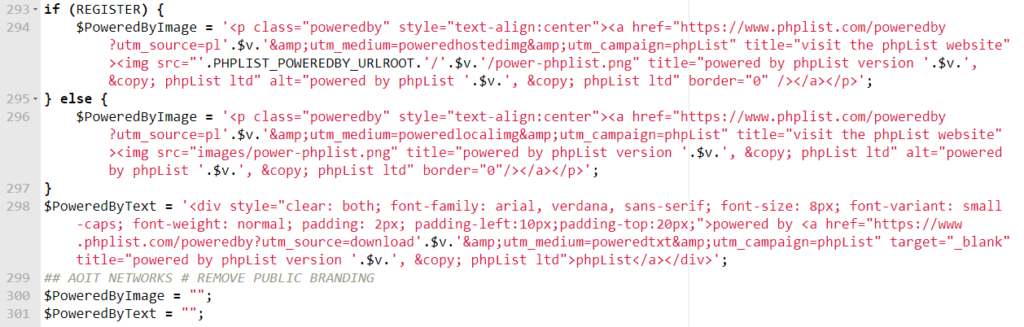
Remove Powered By Image in phpList Email Templates
To remove the branding from emails sent by phpList, locate the following file:
admin/sendemaillib.phpThere are two sections in this file we need to change – first the text signature.
Find the first instance of $text[“signature”]. It should look like the first line in the image below. Comment out or delete this line, and add the following underneath:
$text["signature"] = "";
Once your file looks like this image, we need to move on and remove the HTML email signature too.
Find the first instance of $html[‘signature’].
This time comment out or delete the whole if statement, since it isn’t needed, and add the following line:
$html['signature'] = "";Your code should look like the following image if you commented out the if statement.

That’s it – the “Powered by” branding across your public phpList pages and outgoing emails should now be removed.
If you’d rather rebrand this to your own company than remove it entirely, you can add or modify the same lines to suit.