What is DMARC? Understanding DMARC Records
Domain-based Message Authentication, Reporting & Conformance, or DMARC for shorts, is a protocol that uses SPF (Sender Policy Framework) and DKIM (DomainKey Identified Mail) to verify the authenticity of emails. DMARC records help ISPs (Internet Service Providers) prevent malicious emails reaching recipients and reduces the possibility for domain spoofing or phishing attacks. DMARC records allows
1 November 2022 3 min read
Domain-based Message Authentication, Reporting & Conformance, or DMARC for short, is a protocol that uses SPF (Sender Policy Framework) and DKIM (DomainKeys Identified Mail) to verify the authenticity of emails.
DMARC records help ISPs (Internet Service Providers) prevent malicious emails reaching recipients, and reduce the risk of domain spoofing or phishing attacks.
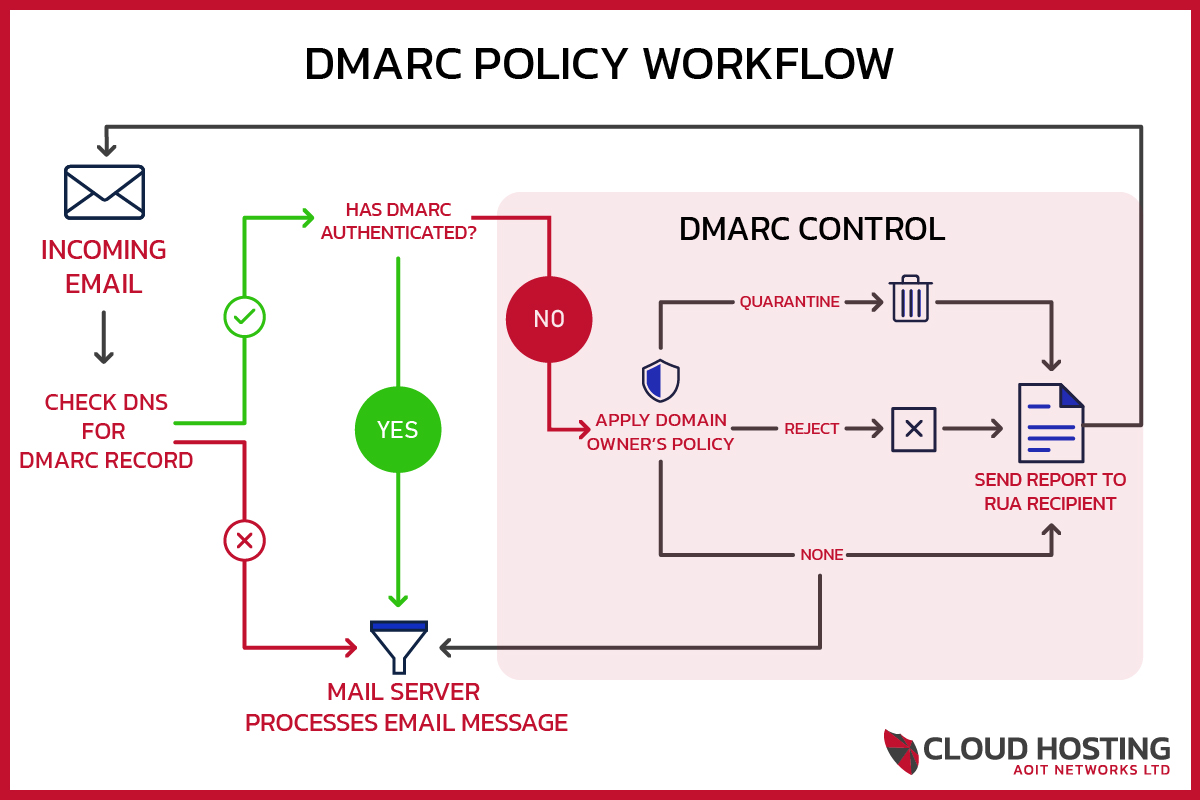
A DMARC record lets email senders specify how mail servers should handle incoming emails that weren’t authenticated using SPF or DKIM. Senders can choose to have such emails sent to the recipient’s junk folder, or blocked completely before they reach a mailbox. This helps ISPs identify spammers and prevent malicious email from reaching consumers’ mailboxes, while minimising false positives and providing better authentication reporting for greater transparency.
It’s worth noting that not all mail servers currently perform a DMARC check when receiving email messages. However, all major ISPs do perform this check, and DMARC adoption is steadily growing among large and small organisations alike.
What does a DMARC record look like?
Here is an example of a DMARC record – this is AOIT’s own DMARC record:
v=DMARC1;p=quarantine;rua=mailto:dmarc@aoitnetworks.com;ruf=mailto:dmarc@aoitnetworks.com;rf=afrf;pct=100
Breaking this down section by section:
v=DMARC1
Version – When a receiving server scans the DNS records for the domain it has just received an email from, it looks for a TXT record beginning with v=DMARC1. If none is found, no DMARC check is performed.
p=Quarantine
Policy – This dictates what the receiving server should do with emails that haven’t passed SPF or DKIM but still claim to be from your domain. We set our policy to Quarantine. There are 3 policies available:
- p=none – The receiving server won’t take any action against the email, but will still report it to the RUA mailbox specified.
- p=quarantine – The receiving server will deliver the mail but quarantine it, typically sending it straight to the recipient’s spam/junk folder.
- p=reject – The receiving server will reject any mail that can’t be verified as authentic from your domain.
rua=mailto:dmarc@aoitnetworks.com
This tells the receiving server where to send aggregate reports of DMARC failures. Aggregate reports are sent roughly once a day and include high-level information about failures, without granular detail on each individual case.
This can be any email address of your choosing. If you want reports sent to an address on a different domain to the one publishing this DMARC record, that other domain needs to publish its own authorisation record confirming it accepts the reports – most reporting tools handle this automatically.
ruf=mailto:dmarc@aoitnetworks.com
This tells the receiving server where to send forensic reports of DMARC failures. Forensic reports are sent when an individual failure occurs and contain specific details of that failure.
The same rule applies as with rua: this can be any address you choose, but a cross-domain address needs that domain’s own authorisation record in place first.
rf=afrf
Reporting Format – This defines the type of reporting sent to the domain administrator. Currently, afrf (Authentication Failure Reporting Format) is the only option.
pct=100
Percent – This tells the receiving server what proportion of mail should be subjected to the DMARC policy above, as a number between 1 and 100.